We have compiled a list of manufacturers, distributors, product information, reference prices, and rankings for Design support software.
ipros is IPROS GMS IPROS One of the largest technical database sites in Japan that collects information on.

Design support software(3D CAD) - List of Manufacturers, Suppliers, Companies and Products | IPROS GMS

Last Updated: Aggregation Period:May 06, 2026~Jun 02, 2026
This ranking is based on the number of page views on our site.

Design support software Product List

1~8 item / All 8 items

Displayed results

Realizing 'effortless 3D conversion' by leveraging the strengths of each aspect of 2D and 3D CAD.

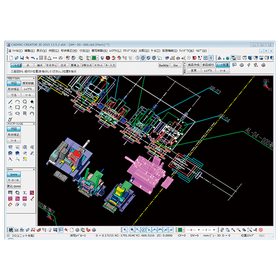
Create a 3D model from the conceptual diagram of 2DCAD. Editing and modifications can be intuitively operated with direct modeling using 'CADPAC-CREATOR'.

"Can we smoothly transition from 2D design to 3D design? What changes will occur once we incorporate 3D design?" There may be 2D CAD designers who are pondering these questions. With CADPAC-CREATOR, instead of jumping straight into 3D design, we first create the necessary 3D models using 2D conceptual drawings, and then we conduct detailed design within the 3D environment. CADPAC-CREATOR enables a "natural transition to 3D" that leverages the strengths of both 2D and 3D. ▼Benefits of Introducing CADPAC-CREATOR▼ - Intuitive 3D modeling with a 2D mindset - Prevention of simple mistakes that occurred in 2D - What is difficult in 2D becomes easy in 3D - Effective use of both 2D and 3D to improve design quality

  • iprosメルマガ2311_02.png
  • iprosメルマガ2311_03.png
  • 3D CAD
  • 2D CAD machine
  • Other CAD
  • Design support software

Added to bookmarks

Bookmarks list

Bookmark has been removed

Bookmarks list

You can't add any more bookmarks

By registering as a member, you can increase the number of bookmarks you can save and organize them with labels.

Free membership registration

Design Review DX "Issues"

Realizing front-loading through design review DX

Anyone can open a 3D model with one click from any PC at any time, directly annotate in 3D during their free time, and collect tasks without missing anything!

  • Company:Scene
  • Price:Other
  • 3D CAD
  • Design support software

Added to bookmarks

Bookmarks list

Bookmark has been removed

Bookmarks list

You can't add any more bookmarks

By registering as a member, you can increase the number of bookmarks you can save and organize them with labels.

Free membership registration

CADPAC-CREATOR for Shipbuilding Outfit Design

A CAD that accelerates equipment design by merging 2D and 3D.

In the shipbuilding industry's outfitting design, there are many complex-shaped components, and it is essential to efficiently integrate 2D and 3D drawings. Particularly in the placement of components in limited spaces and collaboration with other departments, accurate design utilizing 3D models is crucial. CADPAC-CREATOR seamlessly integrates 2D and 3D data, supporting the efficiency of outfitting design. 【Usage Scenarios】 - Piping design - Cable route design - Equipment layout design 【Benefits of Implementation】 - Reduction of design time through effective utilization of 2D drawing assets - Improved accuracy of interference checks using 3D models - Smoother sharing and collaboration of design data

  • cadpac-creator_02.png
  • 2D CAD machine
  • 3D CAD
  • Other CAD
  • Design support software

Added to bookmarks

Bookmarks list

Bookmark has been removed

Bookmarks list

You can't add any more bookmarks

By registering as a member, you can increase the number of bookmarks you can save and organize them with labels.

Free membership registration

Beyond CAD, connecting data - Orizuru 3D

Don't just finish with design. Move the CAD data to the next stage.

How to directly link design data to processing and manufacturing preparation. This is an important theme in improving productivity and preventing rework. If 3D data can be smoothly transferred to subsequent processes, it can reduce verification work and expedite estimates and manufacturing preparations. However, the situation on the ground is not that simple. Even if 3D modeling is progressing in the design department, the manufacturing side still faces issues with interpreting drawings and individual confirmations, leading to a disconnect in information. When this gap occurs between design and manufacturing, it results in repeated confirmations of the same shape, leading to variations in judgment and delays in response. The solution to this design-manufacturing gap is 'Orizuru 3D.' Through shape recognition, similarity searches, automatic estimates, and lightweight 3D displays, it expands design data into procurement and manufacturing preparation, accelerates on-site decision-making, and supports the creation of workflows that are less reliant on individual expertise. 【Features】 ■ Automatic estimation ■ Lightweight 3D rendering in a web browser *For more details, please download the PDF. ■ Reference Article What is CAM/CAD? Explaining the differences from CAE and how it is utilized in manufacturing https://www.cct-inc.co.jp/koto-online/archives/330

  • Other Software
  • Design support software

Added to bookmarks

Bookmarks list

Bookmark has been removed

Bookmarks list

You can't add any more bookmarks

By registering as a member, you can increase the number of bookmarks you can save and organize them with labels.

Free membership registration

Essential for 3D CAD design! Achieving a common interpretation worldwide through geometric tolerances.

Zero ambiguity in drawings. A common language that conveys design intent 100%.

The major advantage of Geometric Dimensioning and Tolerancing (GD&T) is that it completely clarifies design intent, which is difficult to express with traditional dimensional tolerances, and eliminates any discrepancies in interpretation at the manufacturing and inspection sites. In GD&T, datum planes (reference shapes) are clearly established, and by specifying positional tolerances and orientation tolerances relative to them, the tolerance zones directly related to the functionality of the parts can be concretely defined. For example, an instruction that regulates the position of a hole based on datum A and B with a tolerance zone of $\phi 0.2$ standardizes the basis for manufacturing and measurement globally. This contributes significantly to achieving the goal of "producing cheaply, quickly, and accurately," while keeping manufacturing costs down and ensuring stable design quality regardless of where production takes place. The effect is maximized by combining it with the Model-Based Definition (MBD) approach, which directly adds GD&T to 3D CAD models. Please refer to the materials for detailed examples of correct geometric tolerance illustrations and their impact on global manufacturing quality. *For more details, please download the PDF or feel free to contact us.*

  • 3D CAD
  • Design support software

Added to bookmarks

Bookmarks list

Bookmark has been removed

Bookmarks list

You can't add any more bookmarks

By registering as a member, you can increase the number of bookmarks you can save and organize them with labels.

Free membership registration

The risk of improper application of geometric tolerances! The causes of increased costs associated with 3D CAD data.

Lack of knowledge in geometric tolerances leads to scrap, rework, and unnecessary expenses.

Geometric Dimensioning and Tolerancing (GD&T) is a powerful tool, but if applied incorrectly, it can lead to inefficiencies that outweigh its benefits. The difficulty designers face in maintaining knowledge of advanced GD&T principles and standards is a backdrop to this issue. Improper application of GD&T can create errors and misunderstandings in drawings and 3D models, ultimately increasing manufacturing costs. Additionally, repeated discussions over GD&T applications and increased review cycles and revisions can lead to decreased productivity and efficiency. Furthermore, mistakes in tolerances directly result in unnecessary expenses such as scrap, rework, changes, confusion, and downtime. The GD&T Advisor helps prevent these risks and enables the proper application of GD&T to increase tolerances and reduce part manufacturing costs. Let’s verify the risks of GD&T misapplication lurking in your design process with specific examples from the materials. *For more details, please download the PDF or feel free to contact us.*

  • 3D CAD
  • Design support software

Added to bookmarks

Bookmarks list

Bookmark has been removed

Bookmarks list

You can't add any more bookmarks

By registering as a member, you can increase the number of bookmarks you can save and organize them with labels.

Free membership registration

Area Calculation Tool for ARCHICAD

Perform area calculations and create area diagrams with simple operations.

The Quantity Calculation Tool for ARCHICAD is an add-on system (Windows only) that streamlines the quantity calculation tasks, which have played a significant role in the design process. It allows for efficient area calculations from pre-entered 3D building models and 2D drawings with simple operations. The tool supports various tasks, from starting the creation of quantity calculation drawings to making revisions in response to plan changes, enabling accurate and speedy area calculations and drawing creation.

  • Other CAD related software
  • Design support software

Added to bookmarks

Bookmarks list

Bookmark has been removed

Bookmarks list

You can't add any more bookmarks

By registering as a member, you can increase the number of bookmarks you can save and organize them with labels.

Free membership registration